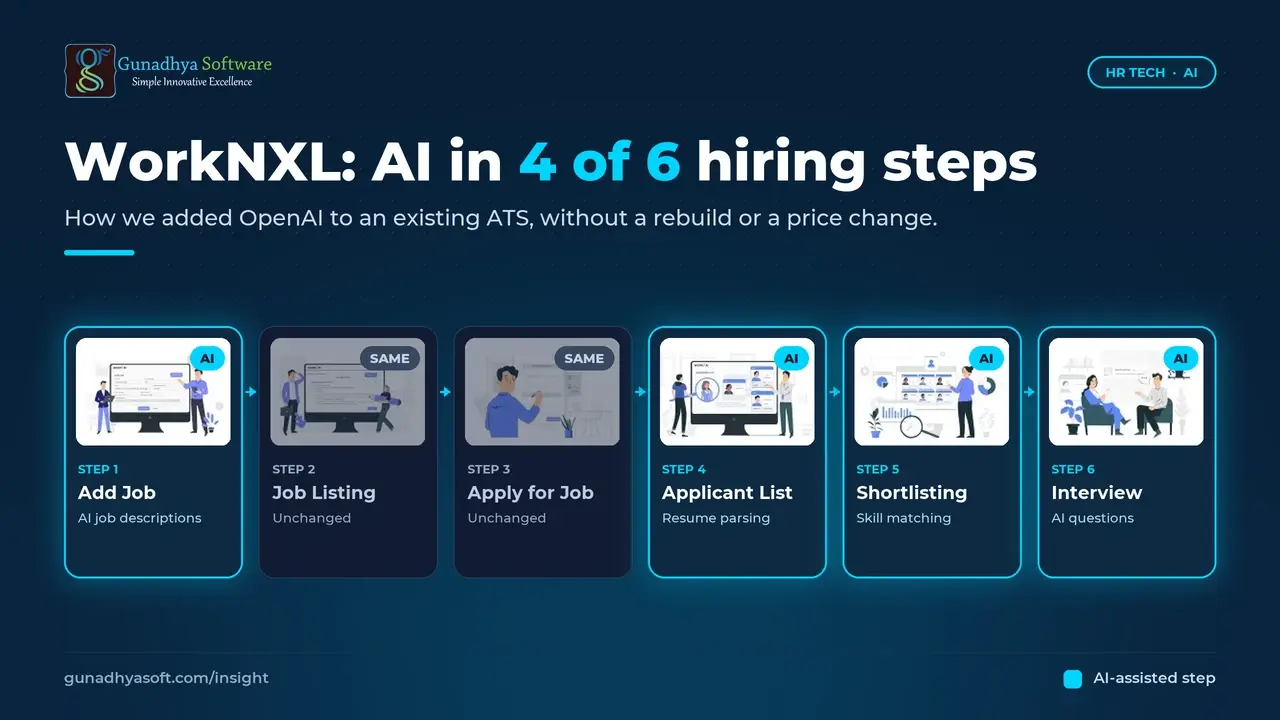
You don’t have to rebuild your SaaS product to add AI. We added AI to 4 of the 6 hiring steps in WorkNXL, our own applicant tracking system, inside the existing PHP/CodeIgniter app. Customers kept the same workflow, the same plans and the same prices.
WorkNXL already had paying customers. Recruiters used it every day to post jobs, collect applications and run interviews. But the slow work inside each step was still manual: writing job descriptions, reading resumes, preparing interview questions.
We had two choices. Rebuild WorkNXL as an “AI-first” product, or put AI inside the steps people already use. We chose the second. Here is what we changed, how we built it, and what we would tell any SaaS owner thinking about the same move.
Why we didn’t rebuild
A rebuild looks clean on a whiteboard. In a live product it is risky and slow, and customers pay for it with disruption.
- Customers already knew the workflow. Small HR teams had learned the six steps. A new interface would mean retraining them, and some would leave.
- The data was already there. Jobs, candidates and plans lived in MySQL. AI could read from and write to the same tables.
- The problem wasn’t the structure. WorkNXL organised hiring well. The pain was the manual work inside each step, and that is exactly the kind of work AI is good at.
- A rebuild delays value. Months of rewriting before customers see anything new. Adding AI step by step let us ship one improvement at a time.
Our rule was simple: AI has to fit into the product, not replace it.
Where AI went: 4 of 6 hiring steps
We mapped every step of the WorkNXL workflow and asked one question: where do recruiters spend the most time on work that isn’t judgement? Four steps qualified. Two didn’t need AI, so we left them alone.
| Step | Before | After | AI? |
|---|---|---|---|
| 1. Add Job | Recruiters wrote every job description by hand | Enter role, skills and details; get a structured JD to review and edit | Yes |
| 2. Job Listing | Publish across platforms in one click | Unchanged | No |
| 3. Apply for Job | Branded application page | Unchanged; applications now feed into AI parsing | No |
| 4. Applicant List | Recruiters read every application in full | Resumes parsed automatically, with AI insights on the consolidated list | Yes |
| 5. Shortlisting | Candidates compared to requirements by hand | Skill-to-requirement matching inside the same step | Yes |
| 6. Interview | Notifications and feedback only | Role-specific AI interview questions, plus Google Calendar scheduling | Yes |
Leaving steps 2 and 3 untouched was a deliberate choice. Adding AI everywhere makes a product harder to use, not better.
How we built it inside the existing app
WorkNXL runs on PHP, CodeIgniter, MySQL and jQuery. We didn’t change any of that. AI went in as a set of services the existing app calls.
| Layer | What we used | What changed |
|---|---|---|
| Application | PHP + CodeIgniter | New AI services added; core app untouched |
| Data | MySQL | AI reads existing job and candidate data and writes results back |
| Screens | jQuery, HTML5 | An AI action added inside each of the four steps |
| AI | OpenAI | JDs, resume insights, skill matching, interview questions |
| Integration | Google Calendar | Interview scheduling |
Three design rules guided every feature
- AI suggests, the recruiter decides. Every AI output can be edited before it is used. No candidate is selected or rejected by AI. Selections always need a person’s approval.
- Every suggestion is logged with its basis. If a recruiter asks why a candidate was ranked higher, the reason is on record. This matters for fairness and for data protection under India’s DPDP framework.
- AI lives where the work already happens. No separate AI tab, no new login. The recruiter clicks a button inside the step they are already on.
What stayed the same
- The biggest result is what customers didn’t have to do.
- Same six steps. Nobody had to learn a new product.
- Same plans and prices. Petite, Pro and Grande kept their prices and limits. AI is included in every plan, at no extra charge.
- Same data. No migration, no export and re-import.
That made the release easy to adopt. Customers saw new buttons in familiar places, tried them, and kept using them. Customers can now generate job descriptions faster using AI, reducing manual effort and making the hiring workflow more efficient. The new capabilities are available directly within WorkNXL, without requiring customers to adopt a separate platform.
Checklist: adding AI to your own SaaS product
If you run a SaaS product and want AI in it, this is the order we’d follow again.
- Map the workflow. List every step a user goes through, start to finish.
- Find the slow, repetitive work. Mark steps where users write, read or compare large amounts of text by hand. Those are your AI candidates.
- Leave the rest alone. If a step already works in one click, don’t add AI to it.
- Build AI as services. Keep your core app and database. Add AI behind an API your existing screens call.
- Keep a human in charge. Make every AI output editable. For decisions about people, money or compliance, require approval.
- Log what AI suggests and why. You will need it for support questions, audits and data protection.
- Ship one step at a time. Release, watch usage, fix, then move to the next step.
- Decide pricing early. Include AI in existing plans or charge for it, but decide before launch. We included it, which made adoption easy.
- Most legacy stacks can do this. PHP, Java, .NET or Node: if the app can make an HTTP call, it can use AI.
Frequently asked questions
Yes. Add AI as services that your existing app calls, inside the steps users already know. Gunadhya did this for WorkNXL, a PHP/CodeIgniter applicant tracking system, without changing its workflow, data or prices.
The steps where users spend the most time writing, reading or comparing text by hand. In WorkNXL, that was job descriptions, resume review, shortlisting and interview preparation.
No. If your application can make an API call, it can use AI. WorkNXL kept PHP, CodeIgniter, MySQL and jQuery, and added OpenAI as a service.
No. In WorkNXL, AI suggests and the recruiter decides. Every output is editable, every suggestion is logged with its basis, and selections need human approval.
It depends on your market. WorkNXL included AI in every existing plan at no extra cost, which made adoption easy for small HR teams.
It depends on how many steps you change. Releasing one step at a time lets customers see value early instead of waiting for a full rebuild.
Want AI in the software you already have?
We added AI to WorkNXL without a rebuild, and we can do the same for your product. Gunadhya Software Solutions is a Pune-based product engineering company with 11 years of building and maintaining custom software, SaaS platforms and HR tech.
Tell us about your product. In a 15-minute call, we’ll show you which steps are worth adding AI to, and which ones to leave alone.
Book a 15-minute call or Contact us today to discuss your requirements· Read the full WorkNXL case study · Try WorkNXL free