
ESG Consultancy Case Study: Digitizing Carbon and EcoVadis Engagements from Enquiry to Final Report
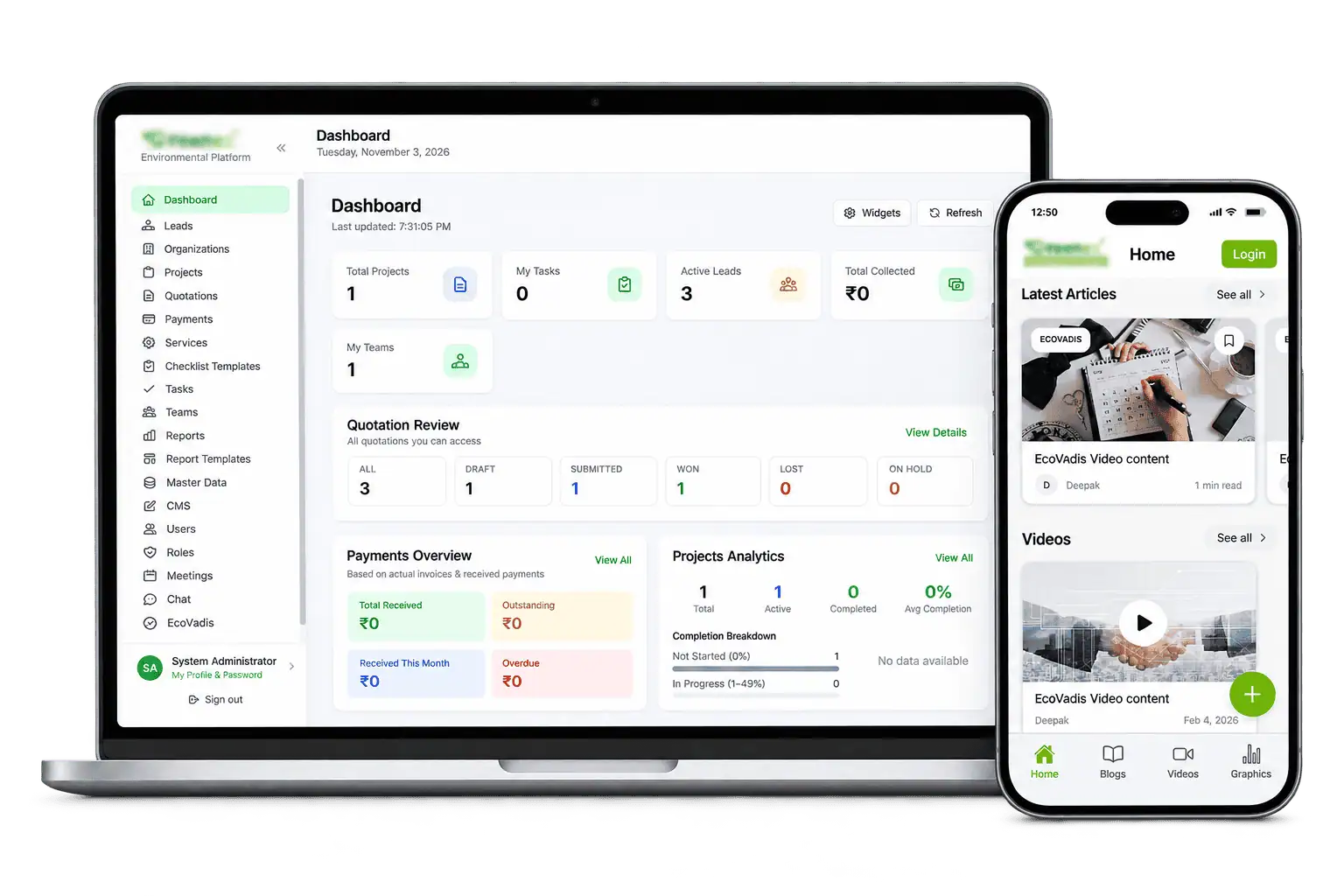
Gunadhya Software Solutions built a web platform, client portal and mobile app for an environmental and ESG consultancy. We wrote the requirements, then engineered one system that runs every engagement: enquiry, quotation, client checklists, verification, carbon calculations, draft reports, client review, payment and final handover. EcoVadis documentation and carbon footprint work (Scope 1, 2 and 3) now run on the same workflow.
- Client
- Environmental & ESG consultancy (name withheld)
- Industry
- Sustainability & ESG consulting
- Engagement
- Requirements, web app, client portal, mobile app, private cloud
- Timeline
- 6 months
- Team
- 4 people
At a glance
- The client. An environmental consultancy delivering carbon footprint studies, EcoVadis support and environmental reports.
- The problem. An 11-stage engagement ran on email, Excel and Word, with no single view of where each project stood.
- What we built. Internal web app, client portal and mobile app, with a checklist engine, verification gate, calculation engine and auto-generated reports.
- Stack. React, Node.js, Prisma, PostgreSQL, Redis, React Native, on private cloud.
- Result. All three products shipped in 6 months with a team of 4 people.
About the client
Carbon and ESG reporting, delivered to a fixed process
The client helps companies measure and report their environmental performance. Clients come for carbon footprint studies across Scope 1, 2 and 3, EcoVadis rating support, and environmental reports. Every engagement follows the same steps, and much of the work depends on clients sending the right data and documents on time.
What we delivered
Requirements (SRS)
A full specification of the client's workflow, roles, statuses and modules, signed off before build.
Internal web app
Leads, quotations, projects, checklists, tasks, execution files, reports and payment tracking.
Client portal
Clients fill checklists, upload documents, review drafts, comment, approve and download invoices.
Mobile app
Blogs, graphics and videos from a CMS, enquiry form, training alerts and project status for clients.
EcoVadis module
Four theme checklists with gap tracking and a one-click export of the full EcoVadis document pack.
The Challenge
Eleven stages, many hands, one client waiting
Each project passes through analysts, reviewers, accounts and the client before the final report goes out. Data came in by email, calculations lived in Excel and reports were assembled by hand in Word. Nobody could see at a glance which projects were stuck, waiting on the client or waiting on payment.
The engagement workflow
- Kick-off
- Quotation
- Checklist
- Assignment
- Verification
- Execution
- Draft report
- Client review
- Account closure
- Final report
- Tax invoice
Client data, on time
Each service needs dozens of data points and documents from the client, and incomplete data stalls the whole project.
Quality before work
Analysts should not start calculating until a reviewer has checked the client's data.
Manual reports
Excel calculations were copied into Word reports by hand, version after version.
Seven roles
Ops, analysts, reviewers, accounts, content admins and clients each needed exactly the right access.
Our Approach
We mapped the process first, then built the platform around it
- 1
Requirements first
We wrote the SRS with the client: every stage, status, role and document, before writing code.
- 2
Separate statuses
Each project tracks verification, execution, client review and payment on their own, so nothing hides behind one label.
- 3
Checklists as templates
Admins build checklist templates per service. New services need configuration, not code.
- 4
Calculations in the app
We moved the client's Excel emission formulas into the system, so results flow straight into reports.
- 5
Role-based access
Seven roles, enforced at the API, with every verification and payment change logged.
Product Spotlight
The Verification Gate: no calculation on unchecked data
The Verification Gate sits between data collection and execution. A reviewer checks every client checklist and passes or fails it with comments. Execution stays locked until the whole project passes. Calculated results then flow into a Word and PDF draft report automatically.
Step 01
Collect client data
Clients fill service checklists and upload documents in the portal. Each checklist shows how complete it is, so gaps are visible early.
- Service checklists
- Document uploads
- Completion tracking
Step 02
Verify checklists
The reviewer opens each checklist, passes or fails it with comments, then sets the project-level result. Every decision is logged.
- Scope 1 · Fuel and refrigerants Passed
- Scope 2 · Purchased electricity Passed
- Scope 3 · Business travel, logistics Changes requested
- Pass/fail per checklist
- Reviewer comments
- Audit log
Step 03
Execute and calculate
Analysts work through assigned tasks and upload execution files. The calculation engine computes emissions from verified data.
- Task assignment
- Execution files
- Emission calculations
Step 04
Generate the draft
The system fills the service's report template with checklist data and calculated values, and produces Word and PDF drafts.
- Template-based reports
- Word and PDF output
- Version numbering
Step 05
Review, close, hand over
Clients comment on the draft and approve it. Once payment is recorded, the final report and tax invoice appear in the portal.
- Client comments
- Payment tracking
- Final handover
Illustrative sample project. Company name and figures are not real.
Results
What we delivered
Technology Stack
What the platform runs on, and why
React
One web app for the internal team and the client portal, with views by role.
Node.js, Prisma
REST APIs with role checks on every sensitive action.
PostgreSQL, Redis
Relational data for projects and checklists; queues for emails and report generation.
React Native
Content, enquiries, training alerts and push notifications for clients.
Private cloud
Deployed on the client's own cloud with no public URL, so client data stays inside their environment.
DOCX and PDF templates
Reports built from templates with placeholders filled by checklist and calculation data.
FAQ
Frequently asked questions
What did Gunadhya Software Solutions build for this consultancy?
Gunadhya Software Solutions built an environmental and ESG consultancy an internal web app, a client portal and a mobile app. Together they run every engagement from enquiry and quotation through checklists, verification, calculations, draft reports, client review, payment and final report handover.
How does the platform handle carbon footprint work?
The consultancy builds checklist templates for Scope 1, 2 and 3 data. Clients fill them in through the portal, a reviewer verifies them, and the in-app calculation engine computes results that flow straight into the draft report.
Does it support EcoVadis?
Yes. The EcoVadis module has checklists for Environment, Labour and Human Rights, Ethics and Sustainable Procurement. It highlights missing mandatory documents and exports a full report pack of data and documents.
What technology is the platform built on?
The web app and client portal run on React with Node.js APIs and PostgreSQL. Redis handles background jobs such as emails and report generation, and the mobile app is built in React Native. It is deployed on the client's private cloud.
How long does it take to build a platform like this?
This platform took 6 months with a team of 4 people, from requirements to all three products shipped. Timelines depend on the number of services, reports and integrations. We share a fixed estimate after a short discovery call.
Can Gunadhya Software Solutions build a workflow platform for our consultancy?
Yes. We build workflow and reporting platforms for consultancies, labs and service firms, including client portals, checklist engines, calculation engines and automated reports. We can start with requirements if you don't have them yet. Book a call to discuss your scope.
Running your consultancy on email and Excel?
We built this platform from requirements to production. Tell us how your engagements run and we'll tell you how we'd digitize them.